Every year, PERS publishes two types of actuarial valuation reports:
- A system-wide report assessing the health of the system as a whole.
- Individual reports for nearly every PERS-participating employer.
The reports are calculated and created by the PERS consulting actuary Milliman based on information they gathered the
previous year.
- Valuations published in
odd years are advisory. They do not set contribution rates; instead, they show what your rates
would be if they were set based on this valuation.
- Valuations published in
even years are rate-setting. They show what employers' new contribution rates will be for the
next biennium starting on July 1.
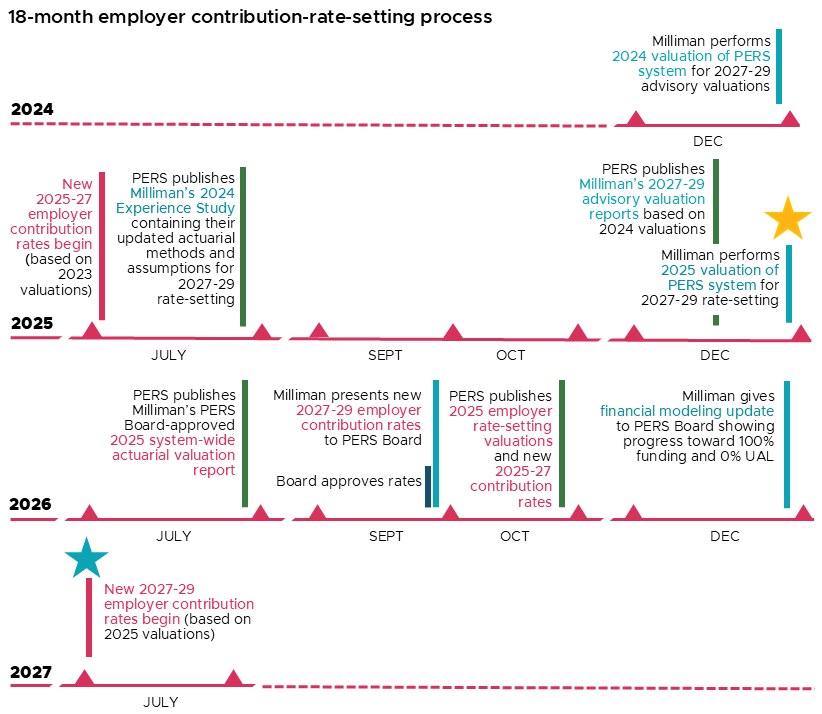
Rate-setting process
Rate-setting is an
18-month process. Rates are set based on the valuation from the previous odd year.

How reports are organized
Employer actuarial valuation reports are grouped together into large files called zip files. You need to download
the zip file that contains your organization’s report and delete the rest of the file.
The valuation zip files are organized like this:
Independent employer valuations are in one zip file.
Independent employers are those who do not belong to the State and Local Government Rate Pool or School
District Pool.
State and Local Government Rate Pool (SLGRP) valuations are separated into three zip files, grouped by
employer number.
State agencies, public universities, and other statewide entities* do not receive separate valuations; they
refer to the valuation for employer #1000.
- School District Pool valuations are in one zip file. School districts that do not have side accounts do not
have individual valuations; they refer to the valuation for employer #3000.
*Other statewide entities include semi-independent agencies, boards, commissions, and public corporations.
Instructions for downloading reports
To download an actuarial valuation report:
-
Click the name of the zip file below that contains the valuation report.
-
Save the zip file to your computer or server. If it automatically saved, check your Downloads
folder to locate the downloaded zip file.
-
Double-click the file to open it (or you may need to extract the zip file, depending on your
operating system). Scroll through the list of PDF files (or use the search field) to find the valuation you
need.
-
Save the PDF file to a folder on your computer or server.
-
Delete the zip file.
2024 actuarial valuation reports
Independent employers*
School districts**
SLGRP ER # 1000-2245
SLGRP ER # 2247-2659
SLGRP ER # 2660-2999
System-Wide 2024 Actuarial
Valuation Report
*Employers who are not part of the SLGRP.
**School districts without side accounts should reference the valuation for ER # 3000, under "School
Districts."
Find
previous years' valuations.
Return to the
Actuarial & Financial Information for
Employers webpage.