Enhancement Details
With this enhancement, when the 'Permit Issuance' workflow task is resulted as 'Permit Issued', the permit report will automatically generate and email out to the applicant of record – all behind the scenes. It will also automatically save the permit report to Documents and the email to Communications tabs on the record. This enhancement applies to the Building, Public Works, and Onsite modules where permits are issued through workflow.
Information on this functionality
The permit report will not display as a pop-up upon issued status result, to avoid it potentially being sent twice to the Applicant – but you will get a notification pop-up letting you know the permit report has been sent.
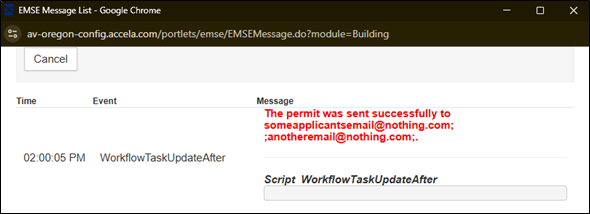
While the Applicant is default checked (as required) in the Workflow Email section for this functionality, you can also add any of the other record contacts or free type in the 'Other' field.
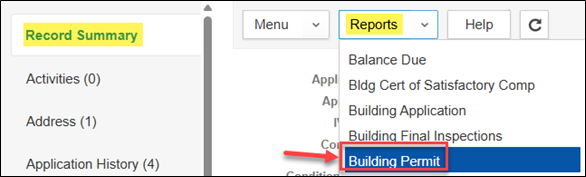
The permit report for this function has a unique name so it is easily identified under Documents, the report name is 'Building ACA Permit'. If you need to run the Permit report again for any reason, once workflow is completed – go to Record Summary > Reports dropdown and run the permit report for that record type – example provided is for Building Structural record. The standard permit report name when run from Record Summary is 'Building Permit', no 'ACA' in the report name.
You can't open the saved permit report through Documents and have the direct email option available – this email functionality is only available at the time a report is actively generated. Reminder: duplicate copies of the permit should not be retained on records ideally, deleting duplicates should be done, when possible, as good housekeeping to retain only the most current.
The email that is automatically sent is saved to the Communications tab on the record for record-keeping purposes.
Purpose of Enhancement:
This enhancement came out of agencies asking that – as best practice – at permit issuance processing through workflow, the permit would be automatically sent to the applicant of record to save them added clicks/steps. This was done – however with the permit report still displaying as a pop-up, the permit report was frequently being sent twice to the applicant of record, in error, unbeknownst to many agencies that it had already been automatically emailed to the applicant behind the scenes. As a result, the permit report will no longer display as a pop-up to signal agency users that the permit report was automatically sent already. Agencies can regenerate the permit report if needing to email it to additional contacts.