How you are invoiced
Every weeknight between 9 p.m. and 6 a.m. Pacific Time (except holidays), the PERS EDX system processes the employer
reports you released. EDX takes the wages you reported and, for those members who earn benefits, multiplies the wages
by your employer contribution rate. The sum is what you owe on your remittance statement. EDX provides links to
detailed invoices that break down charges by type (e.g., pension, IAP) and by individual employee. You can download
these invoices, as explained in
employer
reporting guide 26,
Understanding Your Statement, section “Downloading Your Invoice.”
When you are invoiced
Invoices gather in your Unbilled Activity list between statement dates. On your statement date, unbilled activity
moves to your remittance statement.
EDX creates remittance statements on the 5th and 20th of each month (or prior business day if either date falls on a
weekend or holiday).
- Records that posted from the 21st of the previous month to the 5th of the current month will appear on the
remittance statement generated on the 5th; records that posted from the 6th to the 20th will appear on the
remittance statement generated on the 20th.
- EDX creates statements on the 5th and the 20th even if no wage and contribution or other invoices exist.
- Records from multiple reports may post in the same batch; a statement may contain activity from multiple
reports.
Viewing your invoice
To see your invoice, select View Your Statement from the main EDX Site Navigation menu.

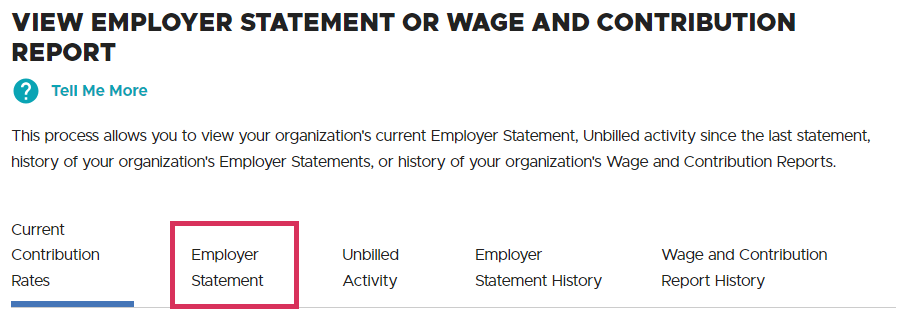
On the View Employer Statement or Wage and Contribution Report screen, click the Employer Statement tab.
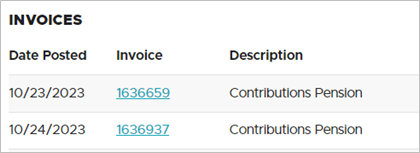
Your statement includes invoices for all the different types of charges in your statement. On your statement,
you can click the linked invoice number to open the invoice.
Downloading your invoice
For instructions on downloading your statement to an Excel file, read section “Downloading Your Invoice” in
employer
reporting guide 26,
Understanding Your Statement.
Your contribution rates
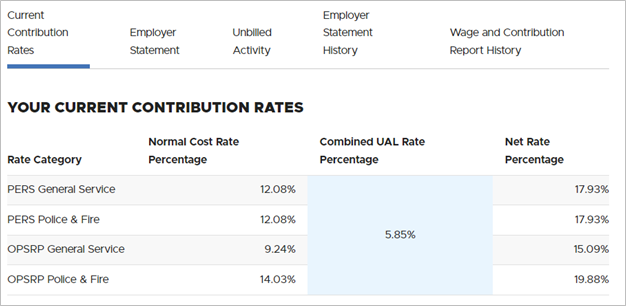
On the View Employer Statement or Wage and Contribution Report screen on the
Current Contribution Rates tab, you can view the rates you are paying for employees in the three
PERS plans — Tier One and Tier Two (called “PERS") and the Oregon Public Service Retirement Plan (OPSRP) — as
shown in the sample screen below.
Special charges
The following are extra charges that may appear on your statement. They are not linked to an invoice because they
are generated outside EDX. The charge is usually accompanied by an explanatory email that includes a detailed
invoice. For more information on a charge, contact your
ESC representative.
Prior year earnings (PYE)
For all reports you submit by year-end and invoices you pay by year-end (year-end is the March 5 statement of the
following year), your employees receive a deposit of interest earnings (if any) from the PERS Fund into their IAP
accounts.
For reports you do not post in time for that year and invoices you do not pay in time, your organization must pay
the earnings (if any). The bill for those earnings appears on your statement as “IAP ER Prior Year Earnings,” as
shown in the image below. (This may look different for years before 2004.)

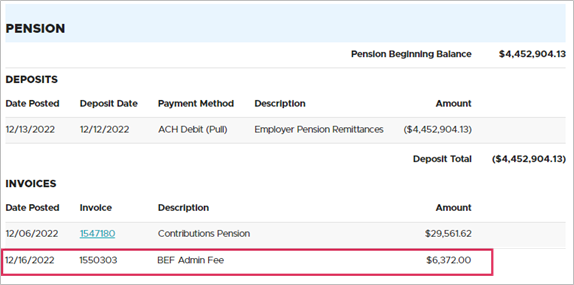
BEF admin fee
Employers who have employees who are paid from the Benefit Equalization Fund (BEF) are assessed a fee to fund those
benefits.
The BEF pays the amount of PERS benefits earned by these few members (approximately 100 each year) over and above
the IRS limits.
Learn more on the
EDX Invoice Questions webpage.
Social Security
Oregon public agencies pay a fee to help cover some of the costs of administering Social Security coverage to
Section 218 employers (go to the
Social Security Section 218 Agreements webpage to learn
more). The contributions (charged on a prorated basis to each agency) are deposited into the state’s Social Security
Revolving Account and used by the PERS Board to administer Social Security coverage.
Non-PERS participating employers receive their invoice by email. They pay their invoice by mailing a
check to the state Social Security administrator at PERS.
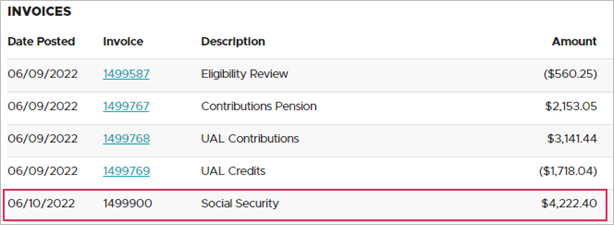
PERS-participating employers receive their invoice in EDX. However, the invoice is not clickable
because it is manually generated outside the PERS reporting system. These employers receive a detailed invoice by
email and pay the invoice through Automated Clearing House.
Learn more on the
Oregon Section 218 Social Security Coverage webpage.
Wash UAL Credits
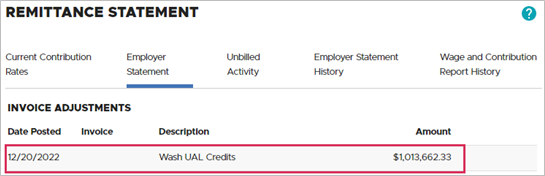
The current year’s accumulated unfunded actuarial liability (UAL) credit and side account credit must be “zeroed
out” at the end of the calendar year. Any remaining unused credits are credited on your last invoice of the year and
factored into your future contribution rate.
Learn more on the
EDX Invoice Questions webpage.
Understanding your statement
Read
employer
reporting guide 26,
Understanding Your Statement.
Paying your invoice
Read
employer reporting
guide 27,
Paying Your Invoice.