When your employee takes time away from work, how do you know if you need to report that time off to PERS?
Do report this type of time off to PERS
You should only report time off that meets the following three requirements:
- The days off equal the
major fraction of the month; that is, more than half the calendar days in a calendar month. Count all calendar days starting with the first day of leave in the month and ending with the last day of leave in the month in which they return.
- The leave days are
unpaid by the employer. Pay from a third party is still considered unpaid by PERS. Any pay from the employer, such as sick leave, paid comp time, bereavement leave, of even a fraction of an hour makes a day a paid day.
- The leave is an
official LWOP that was requested by the employee and approved by the employer in writing. Meaning that decades from now, the employer would be able to prove the legitimacy of the leave, if necessary.
Do not report this type of time off to PERS
The following situations are not official leaves without pay and are not reported as a status change to PERS:
- A period when an employee has
no work to do but remains your employee and is available to work upon request.
- A period when an employee is
laid off or furloughed. (In this situation, terminate the employee and rehire them when you have work for them.)
- A period during which your employee is using any
paid time off or receiving any pay from the employer.
- A leave that is
not granted or agreed upon by the employer (e.g., the employee does not show up to work).
- Exception – The following is considered a written LWOP agreement between the employee and employer: the employer has a written policy that allows the employer to put the employee on LWOP if the employee fails to show up for work for a certain number of days, the policy has been acknowledged by the employee, and the employee meets the policy’s conditions.
Visual aid
Follow this chart to decide if you should report your employee’s leave to PERS or not.
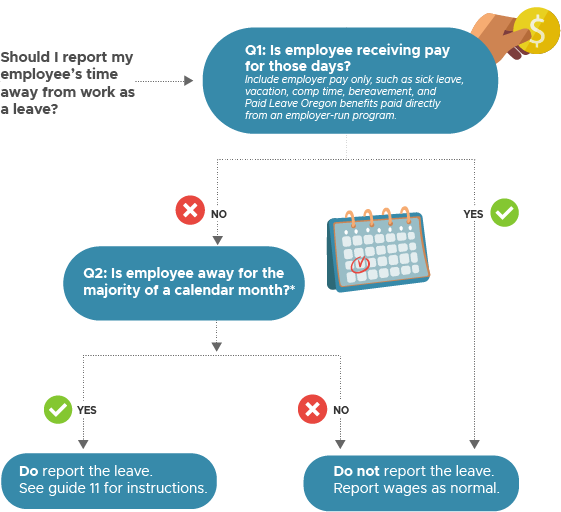
Reporting a leave
Submit a Detail 1 demographics record with one of the unpaid leave status codes available in EDX. When the employee returns to work, submit another Detail 1 record with a 08 – Return From Leave status code. Read
employer reporting guide 11,
Reporting a Leave, for instructions.
Questions?
Read the
leave without pay FAQ on the PERS website.
Learn more