Permissions can be granted to view, add, delete, or download documents to and from a permit in ACA. These permissions can be granted to the following groups:
- All ACA users (does not require sign-in)
- Registered ACA users
- Applicants
- Contacts
- Owners
- Licensed professionals
The attached spreadsheet,
ACA Document Permissions, shows the permissions available for each document type in ACA.
 ACA Document Permissions.xlsx
Note: Each uploaded document has a Document Group/Type where the default ACA permissions are configured. The document will inherit these permissions by default. Documents may not have more restrictive permissions than the default permissions configured for their Document Group/Type.
When you open the ACA professions screen in the Manage Documents dropdown and submit changes, the document will then inherit those changes.
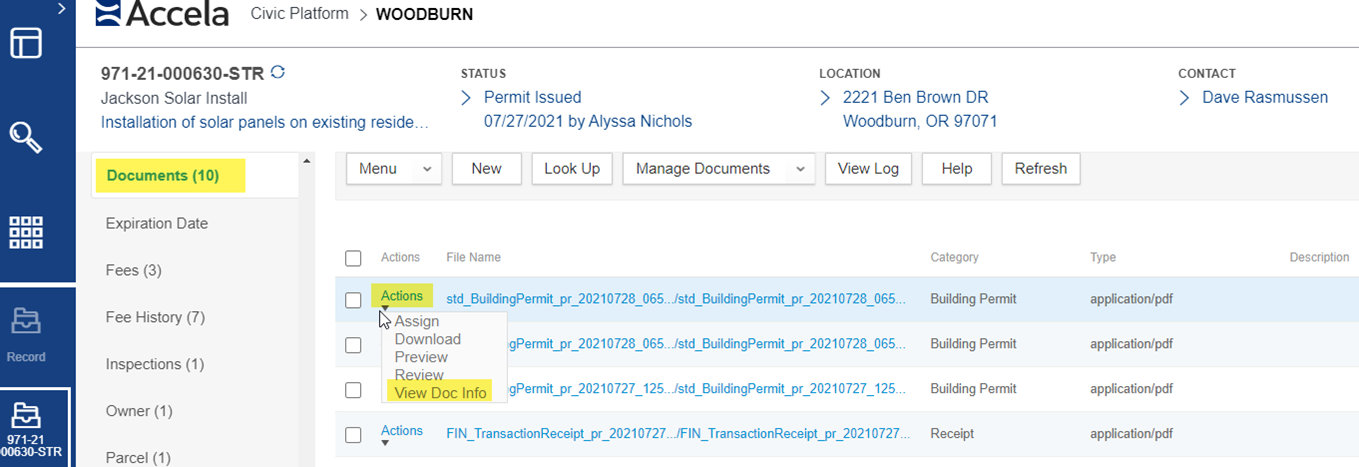
Locate the Record the document is on > Documents Tab > select the Actions dropdown of the document you wish to change permissions on, select View Document Info.
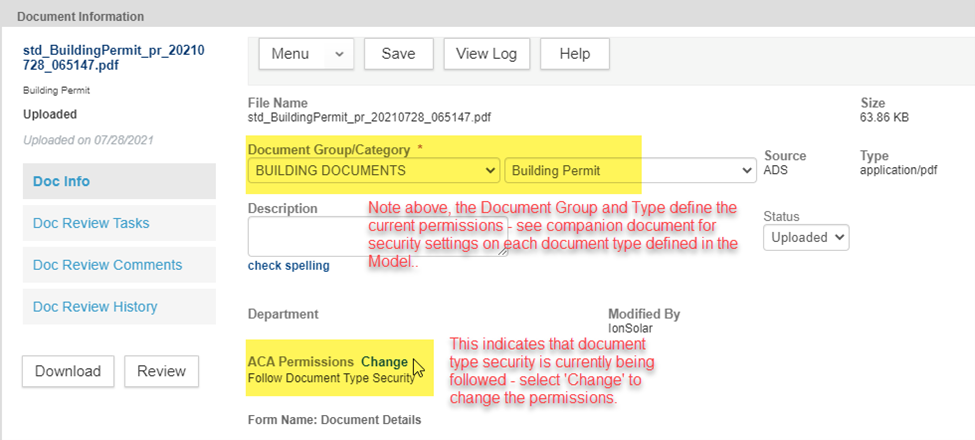
Once the Document Info opens, select the Doc Info tab – the Document Group and Type of the selected document will be indicated – this determines the document’s current security. See companion document for security settings on each Document Type defined in the Oregon Model.
IMPORTANT NOTE, all types of ‘Plans’ are fully restricted, as a result of copyright protection and given ACA is a public website. Plans for certain structures (banks, businesses), particularly essential structures (schools, hospitals, corrections), can be sensitive and used for nefarious purposes – to locate access points, mechanical and electrical systems, etc. Please keep this in mind as you make any changes to permissions on Plans document types.
The Document Type Security window will be displayed. The key permission areas as Viewable in ACA, Downloadable in ACA, and Deletable in ACA (delete not available).
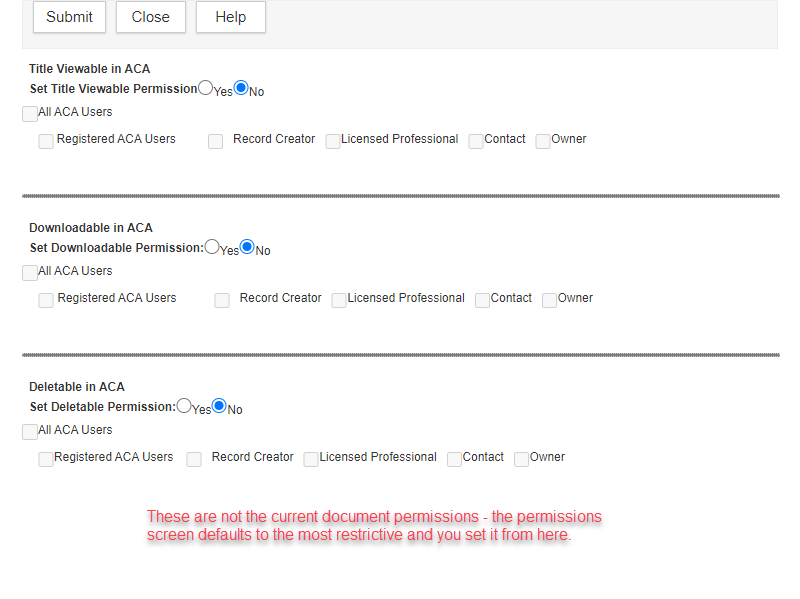
There is an option to set each area for All ACA Users which means the general browsing public, everyone. Then there is an option for Registered ACA Users, this includes all registered ePermitting website users such as contractors, architects, engineers, etc. so is more targeted to those actually doing ePermitting business. Lastly, there are the options of Record Creator (Applicant), Licensed Professional, Contact, and Owner – these are all the people specifically associated to that given record – this would allow only those specifically associated to this given permit/project/application to access the documents. The latter is the most commonly used/recommended when electronic plans need to be made available to those specifically associated to the project.
Submit to save your changes.