The Oregon Public Employees Retirement System (PERS) is available exclusively to Oregon’s public employers. By joining PERS, you join more than 900 other Oregon employers who offer their employees an excellent retirement program as part of their total employee benefit package. For details on PERS benefits, read the
About the PERS Pension and
About the Individual Account Program (IAP) webpages for PERS-participating employers.
Required membership: All Oregon public schools, charter schools, community colleges, state universities, and state agencies automatically participate in PERS.
Optional membership: Local governmental entities such as cities, towns, counties, fire districts, health districts, utility districts, library districts, housing authorities, and ports are welcome to participate in PERS.
Exemption: Public employers of police officers and firefighters are required to participate in PERS
unless they can provide benefits that are equal to or better than the retirement benefits provided by PERS, as determined by the PERS Board. The “equal to or better than” exemption is explained in
Oregon Revised Statute 237.620(2) and
Oregon Administrative Rule chapter 459-030-0011.
-
The Oregon Legislature decides the benefits and rules of the plan, which are outlined in Oregon Revised
Statutes 238
and 238A.
-
The Oregon Treasury and Oregon Investment Council manage and invest the funds
(most of PERS funding comes from investment returns).
-
PERS-participating employers provide data and funds that help fuel their employees’ future
retirement. They use the online reporting system Employer Data Exchange (EDX) to submit job status changes, salary
earned, hours worked, and other employee data to PERS on a regular basis. They pay a contribution rate, multiplied
by their employees’ wages, to PERS through Automated Clearing House (ACH).
-
The PERS agency administers the plan in accordance with the laws passed by the Legislature; sets
employers’ rates, as determined by a consulting actuary; collects payments from employers; and disburses
retirement checks to retirees, alternate payees, and beneficiaries.
-
Monthly pension payments for your qualifying employees for life (employees must work at least
600 hours a year to qualify for benefits). Depending on how long they work and the kind of work they do, their
retirement pay can equal up to about 45% of their salary.
Read the What Is PERS? webpage, section “About PERS
Membership” to learn how employees earn and maintain retirement benefits.
An Individual Account Program (IAP) retirement account funded through monthly deductions of
6%* of an employee’s salary. The 6% payment can be paid by the employee (either pre-tax or after tax) or
covered by the employer. At retirement, employees can receive their IAP on a monthly, quarterly,
semi-annual,
or annual disbursement schedule. They can also choose to receive it as a lump sum or IRA rollover.
*0.75% of that 6% is placed into an account called an Employee Pension Stability Account (EPSA). The
amount in that account is used to pay for a portion of the employee’s pension when they retire.
-
Oregon Savings Growth Plan: While working, employees have the option to contribute to a
deferred compensation retirement account, called Oregon Savings Growth Plan, if the employer elects to
participate in that optional 457(b) plan.
Learn more on the OSGP
webpage for employers.
-
PERS Health Insurance Program: The option to have partially subsidized health insurance after retirement,
called the PERS Health Insurance Program (PHIP).
For educational employers and state agencies
Contact the PERS Employer Service Center (ESC) to establish your organization’s employer account.
By email: Email
pers.edx.support@pers.oregon.gov. ESC
representatives answer emails Monday to Friday from 8 a.m. to 5 p.m. Pacific.
By phone: Call the Employer Call Center between 8:30 a.m. and 12:00 p.m. Pacific at
888-320-7377. Press 1 and then 2.
- ESC will start an account for your organization and assign your organization an employer number.
- ESC will send you the New Employer Data form (#459-261) to fill out. Instructions are included with the
form.
Email or fax the following to the ESC:
- The completed and signed
New Employer Data form.
-
Resolution to participate in the Unused Sick Leave program (optional). Include your
governing board’s approval to participate in the PERS Unused Sick Leave program, if you choose to
participate. This program only applies to employees who are existing members of the Tier One or Tier
Two program. However, even if all your current employees will be eligible for the OPSRP plan, you
may want to get board approval to participate in the program in case you hire a member of the Tier
One or Tier Two PERS Pension Plan down the road.
Learn more about the Unused Sick Leave
program.
Email:
pers.edx.support@pers.oregon.gov.
Fax: 503-603-7626.
For local government entities
-
A local governmental entity must enter into a written PERS coverage agreement before it may begin
participating in PERS. The local government must first submit a signed resolution from its governing
board, and that resolution must set forth various elections.
A sample board resolution is shown at the bottom of this
webpage.
- After the coverage agreement is signed by the necessary parties, a PERS Employer Service Center (ESC)
representative will open an account for your organization and assign you an employer number. They will send
you a New Employer Data form (#459-261) to complete.
- Fill out the New Employer Data form as explained in the instructions included with the form.
What you will pay to PERS to fund your employees’ future retirement benefits depends on several factors, such as:
your headcount, employee salaries, the PERS benefits package employees are earning, if your organization is taking
steps to control your rate by joining an employer pool or opening a side account, investment returns, and much more.
Generally, for an organization that is a new member of PERS whose employees are not existing PERS members, its
contribution rate could be about 20% of the salaries it pays to its employees who qualify for PERS (the employees
would be members of PERS’ newest tier, the Oregon Public Service Retirement Plan (OPSRP)). This is a very general
estimate, and your actual rate could differ greatly. To learn more about how employer rates are determined and
updated every two years, read
Guide to Understanding Your Rate.
Choices and responsibilities after joining
Employers participating in PERS are required to:
-
Continue to be participating public employers for the purpose of the Oregon Public Service Retirement Plan (PERS).
That is, once you join PERS, you must remain a PERS-participating employer.
-
Participate in the Individual Account Program (IAP).
-
Fund the pension benefits for eligible employees who are members of the pension program.
-
Remit information and payments on time.
If you have trouble fulfilling these responsibilities
Issues with contribution rate: If your organization is ever unable to afford your contribution rate, email PERS
Actuarial Activities Section at actuarial.services@pers.oregon.gov. The actuarial experts can analyze why your rate is
high and explain options for controlling it.
Challenges with reporting data or making payments: The Employer Service Center exists to help employers understand the
PERS system, how to report data in EDX, and how to remit payments in ACH. Learn more about ESC in
employer guide 2, Employer Requirements and Support, section “Getting Support From the Employer Service Center.”
Most PERS-participating employers are grouped into “pools” to share costs. Employers in a pool jointly fund the future
pension costs of all pool participants. They also share a percentage of the pool’s liabilities and pay them off as a
group. By sharing liabilities, pool members have a more stable contribution rate.
There are three pools:
The State and Local Government Rate Pool (SLGRP).
Any PERS-participating employer (other than a school district) can join the SLGRP. The SLGRP is the state’s largest
pool. Membership is optional.
Membership in the SLGRP is explained in detail in the Guide to Understanding Pooling: SLGRP.
The School Districts Pool.
The state’s second-largest pool consists of all K–12 school districts in the state. Membership is mandatory.
Membership in the School Districts Pool is explained in detail in the
Guide to Understanding Pooling: School Districts Pool.
Independent employers.
These are the employers who are not pooled. They are grouped together for valuation reporting, but they do not share
costs.
Read the Guide to Understanding Pooling: SLGRP, “System-Wide Pools” section, to learn about system-wide pools in which
all employers participate.
Every PERS-participating employer must assign two roles to manage their PERS account (for a small organization, one
person can fill both roles). The responsibilities of these roles are discussed in
employer reporting guide 3, Reporter Roles and EDX Access.
-
Web administrator. This role manages access to your organization’s account in the Employer Data Exchange (EDX) web
tool. ESC will send you a Web Administrator Agreement Form to enable your chosen administrator to register for an EDX
account.
-
Employer reporter. This role reports employee wages, hours worked, demographic information, work status, job type,
and more into the EDX web tool. Each employer can have up to 15 employer reporters who use EDX.
In addition to the two roles above, your EDX account must include contact information for people who are authorized to
discuss your account with PERS. The web administrator role is responsible for filling in contact information for the
following roles:
Reporting official — Typically the head of the agency/organization or someone responsible for making financial
decisions.
Personnel — Typically the PERS contact in the Human Resources department.
Payroll — Typically the PERS contact in the Payroll department.
Other — Anyone else an employer wants to list as a contact.
This is an overview of paying your invoice. For complete instructions, go to
employer reporting guide 27, Paying Your Invoice.
Complete the agreement form.
To sign up for ACH, complete the PERS Employer: Automated Clearing House (ACH) Agreement form.
Once it is completed, attach the form to an email sent to pers.edx.support@pers.oregon.gov.
Choose debit or credit.
ACH debit (pull) (preferred)
PERS deducts or “pulls” payments from the bank account you designate. Neither PERS nor the state of Oregon charges
transaction fees for this service.
ACH credit (push)
Your organization initiates or “pushes” the payment of funds from your bank to the account PERS designates. You need to
work with your financial institutions before initiating ACH credit transactions.
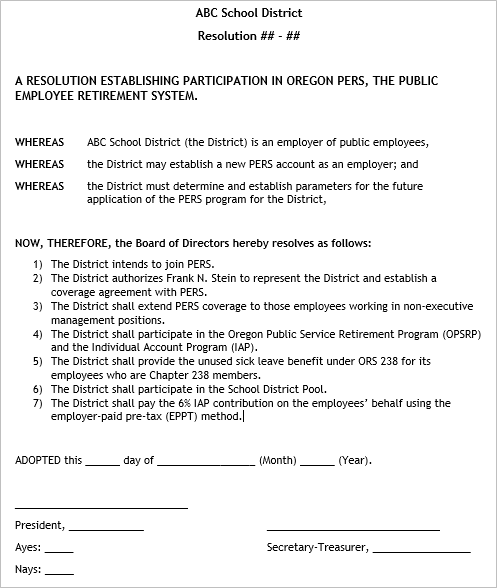
Fictional sample of resolution to establish PERS coverage