Fee updates must be submitted to ePermitting for configuration and installation.
Any building fee update is also required to be submitted to BCD Policy for fee notice (any fee increase, any new fees, any change in methodology that results in a fee increase). The Fee Notice process entails a 45-day open comment period before the fees can be used/go live, so this timeframe should be considered carefully in determining the effective date for fees. When a fee update is submitted to BCD Policy for notice, ePermitting is notified and we provide a fee analysis of the submitted building fees – this analysis includes review for Division 50, Chapter 309, and various other BCD Fee Memos and Policy interpretations – any mark-up is then provided back to the submitting agency. Once a final update is reached, it is then posted for notice and the 45-day period begins.
Non-building fees do not require notice (Planning, PW, Onsite, Site Dev, SDC, etc.), so only a basic fee configuration review is done.
- Submit fee update to ePermitting via a Help Desk ticket – AND also submit for Fee Notice with BCD Policy if the update includes Building fees. Include a copy of your published fee schedule (with changes indicated) when you submit to ePermitting – this helps us to make sure that all of your fees are included and accurate in your agency fee configuration.
- Once a help ticket is created (and a Fee Notice submittal receipted, if applicable) – a fee spreadsheet is exported from your agency and prepared for your update.
- This fee spreadsheet is sent to you via your helpdesk ticket. Updates would be made as follows:
- For existing fees, update Column I (associated account code for revenue reporting), Column W (rate .. and if updated, if there are values in Columns Q and R, they might need updated accordingly). Please fill every row where you’ve made a change, with a distinct color so we can easily tell which they are once you return the updated spreadsheet.
- If there are new fees to be added, you would provide those via the helpdesk ticket email to include fee description / account code association / method / rate / unit -- and we will get those added.
- If there are any fees to be disabled that you no longer wish to use moving forward, please change the text color for that row to RED so they stand apart.
- If you need any help at all, please reach out via your helpdesk ticket.
- The updated spreadsheet is then returned via your helpdesk ticket. Staff review the updates and ask any questions they might have. Then a cursory comparison of the fee spreadsheet to the published fee schedule you provided, is done – any discrepancies are discussed via the helpdesk ticket.
TIPS for updating more complex fee formulas included in the fee spreadsheet
- Structural Building Permit fee in Com/Res Structural * – figures pulled from your Building Permit fee value table – the increments and valuation ranges might vary so could require updating as well. Once set, this same fee formula and rates also applies to Com/Res Structural Non-prescriptive solar installations.
This fee formula alone also applies to Commercial Plumbing Medical gas (valuation) and Commercial Mechanical permit – it is an option for the agency to use the same permit fee value table rates as for Structural, or to use different rates and valuation ranges accordingly (example below).
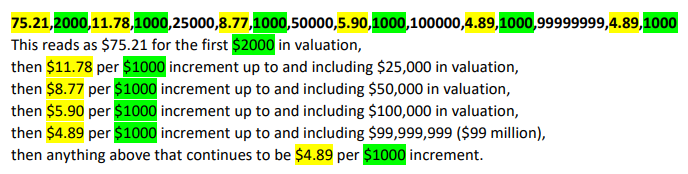
* Important note, this fee formula does NOT include your range starting values because those are ultimately calculated directly using the values above.
Commercial Plumbing – Medical gas (valuation) – see note above

- Stand-alone residential fire suppression system in Residential Structural (and Multipurpose/Continuous Loop system type displayed as Residential Fire Sprinklers in Residential Plumbing) – all other values in this formula must remain as is:

- Single family residence – baths * (this is a new 1&2 Family Dwelling construction fee – is inclusive of ALL interior fixtures being installed at construction; does not include exterior fixtures) – all other values in this formula must remain as is:
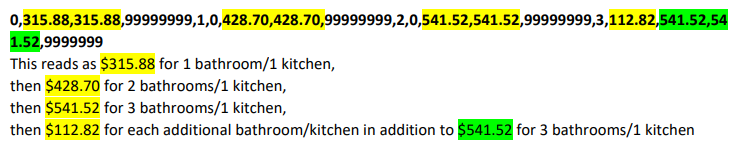
* Kitchens is also an included related fee – formula is shows as 0,1,112.82,1 – or $0 for the first kitchen as it is included in the bathroom package fees above, then $112.82 for each additional kitchen beyond the first (also as indicated in the above bathroom package fee formula)
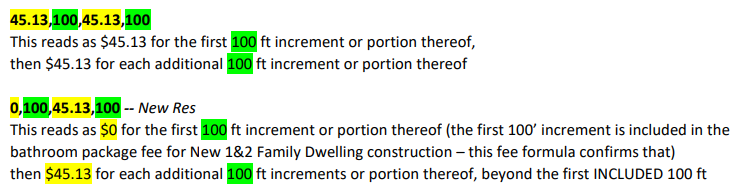
- Site Utilities such as Sanitary sewer – total linear feet, Sanitary sewer – (New Res) total linear feet (also includes Storm Sewer and Water Service):