System Development Charges (SDCs) are fees often assessed on Building and Public Works records, due at new construction.
Construction Excise Tax (CET) fees are allowed excise taxes that can be collected on Building construction records where the agency has the designated program or agreements in place.
The School CET is the most common CET fee type collected by agencies. School CET monies are collected on behalf of the local school district(s), then passed through via payment to the school district, less a small administrative fee portion paid to the agency for their cashiering and coordination efforts.
Invoicing considerations
Because both SDCs and CETs are often very high-dollar amounts, and CETs are not agency revenue, your agency should consider whether or not to invoice these fees and allow them to be paid by credit card. Percentage-based credit card processing fees, which are determined by the individual credit card processing company, could be 3% or more of the fee amount paid, potentially exceeding your administrative fee portion.
Alternatively, if you do not invoice these fees and require an alternate payment method such as check or cash, there will be no processing fees for the agency.
To assess and collect SDC fees:
- On the Building or Public Works record, select the Fees tab
- Select Add
- Select the B_SDC or SDC schedule from the Fee Schedule dropdown
Appropriate fees can now be assessed. Note that the 'Unit' will indicate what values should be entered. An 'Amount' unit often indicates to enter an amount that was calculated outside of Accela.
To assess and collect CET fees:
- On the Building record, select the Fees tab
- Select Add
- Select the CET or Construction Excise Tax schedule from the Fee Schedule dropdown
- Assess the fees by entering the applicable square footage into the appropriate fee item (by school district and type, Residential or Commercial)
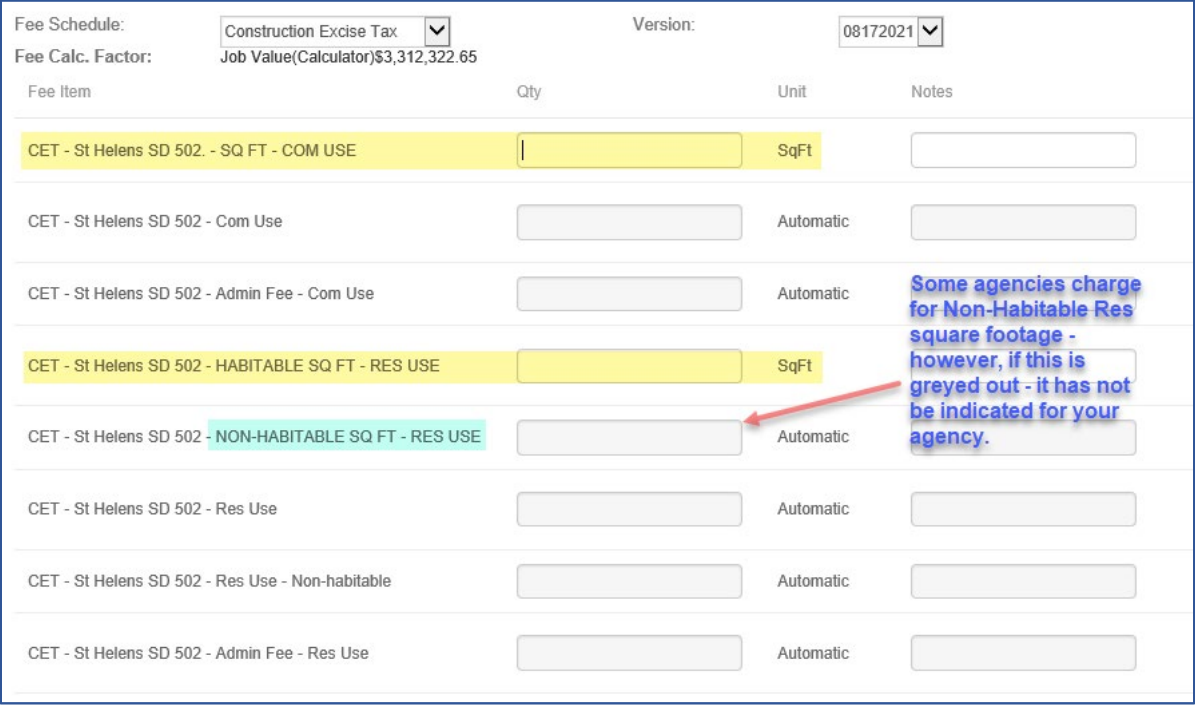
Once the fees are assessed, the
02 – Construction Excise Tax record tab will be auto-filled per the values entered, including the 'School District' designation and 'Habitable Area – Sq Footage'. If the construction is legitimately exempt from School CET, document the reason using the
Exemption dropdown. 'Non-Habitable – Sq Footage' is also included here, if indicated. The other programmatic CETs are also displayed on this tab.
If this CET information is incorrect for any reason, it must be corrected via the fees. The initial CET fees assessed will need to be voided, and new corrected CET fees must be assessed to correct the school district and/or square footage values. The new fees will again auto-fill and effectively correct the 02 – Construction Excise Tax tab for School Excise Tab values.
When CET fees are assessed, they are automatically split per the agency's designated split: a percentage payable to the School District and a percentage retained by the agency for administrative time and effort. A fee 'Note' is automatically added that indicates what square footage figure was used for calculation.
The report CET v3 will show how much of the CET fees have been collected and how much is to be paid and retained. This report can be found in Report 2 > External Payments.