It's important for Inspectors and Building Officials to understand how the system is processing inspection data – from what results are indicating to whether or not it is being counted as a trip in data reports.
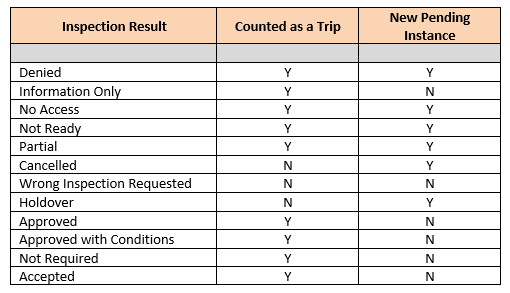
Denied = failing the inspection and citing the required code correction in the Comments.
Information Only = request is typically made by the contractor/homeowner for some level of consultation on a particular portion of the construction – inspector goes out and reviews and provides code reference.
No Access = inspector has no access to the job site or location to be inspected.
Not Ready = inspection was scheduled but the work is not completed/not ready for inspection.
Partial = this is partial approval of a section/area of the named inspection, i.e. Foundation Inspection – due to the size of the project, it may require multiple trips/inspections of the foundation prior to the total foundation being poured/complete. Customer requests which section/area to be inspected – inspector performs the inspection of that specific section/area and partially approves the foundation inspection only for that specific area, noting that in the Comments. Expectation is inspector will go out to inspect other sections/areas up to completion of that particular inspection.
Cancelled = when the customer cancels the inspection at any point in time, but will reschedule again in the near future.
Wrong Inspection Requested = inspector gets to the job site and determines that the wrong type of inspection was requested – schedules the correct type of inspection and performs that inspection within the SAME TRIP.
Holdover = commonly known as “rolling" an inspection – inspection was scheduled for today but due to workload or extenuating circumstances, the inspector is unable to complete that inspection on that day, noting that in the Comments; is often driven by local policy.
Approved = passing the inspection, Comments are optional.
Approved with Conditions = passing the inspection with specific required conditions noted in the Comments, considered complete.
Not Required = most typical case is wrong inspection was requested and no inspection will be provided on that trip; in contrast to Wrong Inspection Requested where correct inspection is scheduled real-time and performed within the same trip.
Accepted = most typical case is work was done in advance of permit sometimes years prior, and inspection is scheduled, work discussed and reviewed, perhaps covered already – but a policy decision is made to accept the work/inspection as complete.
Since this may be new information to some agencies, you may want to verify that your communication materials regarding inspections reflect this same information.
Currently, trip count is most meaningful in the BCD Building Data Request that is required annually by all Building jurisdictions with programs. This report is a compilation of work done by each in the form of statistics and counts. When asking how many inspections were performed – trip count is the data that is measured globally across agencies.
Is the Owner doing their own work?
The ePermitting system has been designed to accommodate when the Owner is acting as their own contractor and doing their own work. When creating a new application or editing an existing record, go to Professionals > do a Look Up or Search for License Type = Owner (Property):
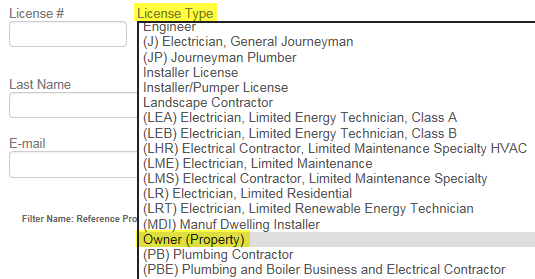
This information is then pulled into the Building Permit report into the Licensed Professional Information section with the following reference, “SEE PROPERTY OWNER INFORMATION".
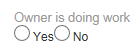
In Workflow, Permit Issuance task there is an optional task related information (TSI) as a tickler for this requirement:
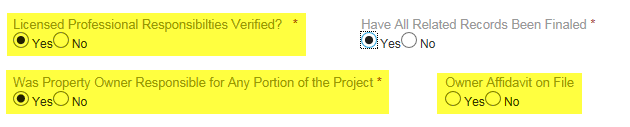
Further along in Workflow, Certificate of Occupancy task there are required TSI for confirming if the Owner did any portion of the work, and if so, if the Owner Affidavit -- see CCB link below for the required form in this case.
For reference, ORS citation regarding when this would be required:
https://www.oregonlaws.org/ors/701.325
CCB Notice to Property Owners about Construction Responsibilities/Owner Affidavit form:
http://www.oregon.gov/CCB/Documents/pdf/property_owner%20adopted.pdf