Service Lock Conditions are used in scenarios where the county provides only specific permit services for cities within their boundaries, like electrical, but they do not provide other services, like mechanical, plumbing, or structural. The Service Lock Conditions are applied to the address and “lock" or hide services that do not apply.
For example:
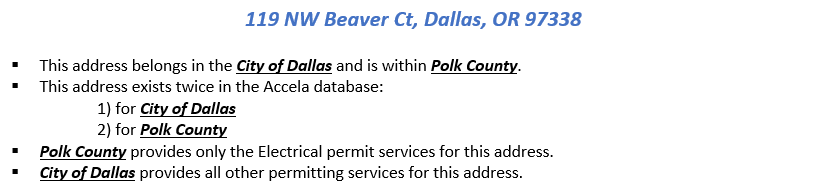
For the
Polk County address, Service Lock Conditions are added for all services, except electrical. This configuration allows the correct services under the correct agency to display on the Public Portal. It also prevents the wrong record type from being created in the Accela Back Office product as well.
The Public Portal:
Public users - using the Public Portal see the following for this example address. City of Dallas provides all permitting services and
Polk County provides only the electrical permitting service.
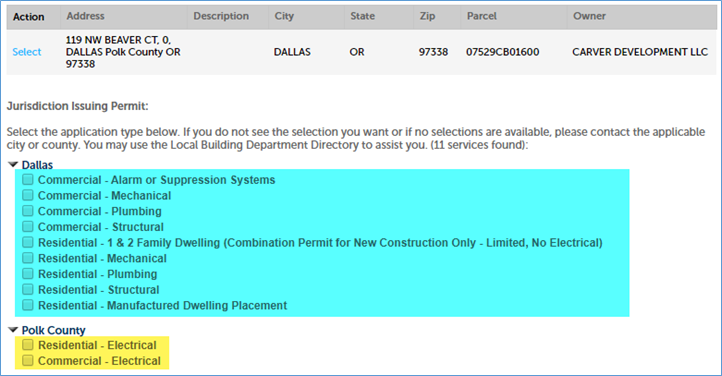
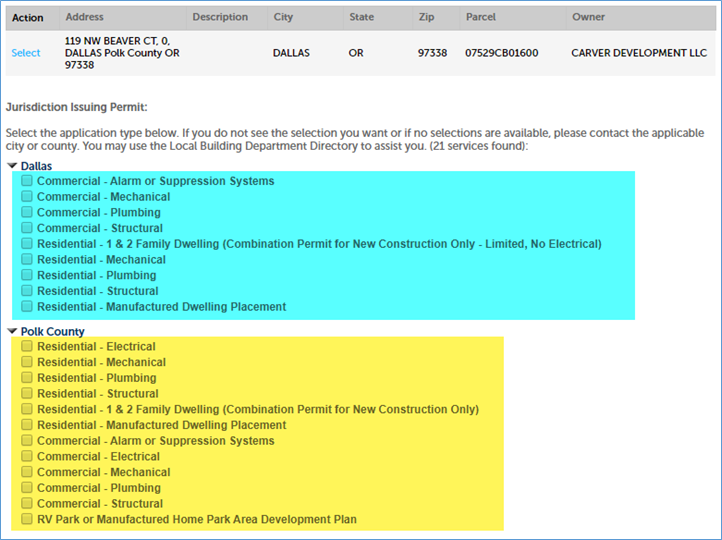
If Service Lock Conditions did not exist on this address for Polk County, public users would see the following. Both
Polk County and
City of Dallas are showing the same services. This adds confusion for the public user. Additionally, they can incorrectly select the permit service in Polk County, like mechanical and a permit would be created for the wrong agency.
Accela Back Office (Civic Platform):
County staff will see the following message if they attempt to create a new record for a record type at an address that they do not permit for, based on the Service Lock Conditions. They will also be prevented from creating the record.

Automated batch script to add service locks:
Service Lock Conditions are added automatically with a database batch script that is run on a nightly basis. First, the script looks at each parcel and evaluates the values on the following Parcel Attributes:
- Electrical Jurisdiction
- Mechanical Jurisdiction
- Plumbing Jurisdiction
- Structural Jurisdiction
- Septic Jurisdiction
Secondly, if the value is NOT the jurisdiction, then a Service Lock Condition is needed and added to the associated address(es).
For example:
- If
Electrical Jurisdiction =
Polk County > then:
- No Service Lock Condition is added for the County address.
- If
Mechanical Jurisdiction =
Dallas > then the following Service Locks are added to the County address(es):
- Commercial – Mechanical
- Residential – Mechanical
- If
Plumbing Jurisdiction =
Dallas > then the following Service Locks are added to the County address(es):
- Commercial – Plumbing
- Residential – Plumbing
- If
Structural Jurisdiction =
Dallas > then the following Service Locks are added to the County address(es):
- Commercial – Alarm or Suppression Systems
- Commercial – Demolition
- Commercial – Structural
- Residential – 1 & 2 Family Dwelling (Combination Permit for New Construction Only)
- Residential – Manufactured Dwelling Placement
- RV Park or Manufactured Home Park Area Development Plan
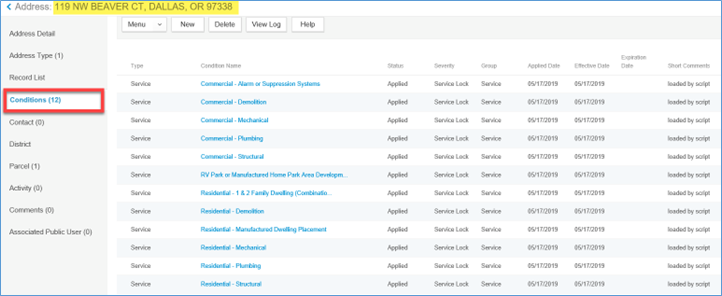
The Conditions can be seen in the Back Office. Go to the
Launchpad > open the
Reference Address page > search for the appropriate
Address > navigate to
Conditions:
Agency's data responsibility:
Agencies that need Service Lock Conditions must maintain the data values in the Parcel Attributes mentioned above. These can be maintained in two different ways:
- Manually through the Accela Back Office product in the Reference Parcel page.
- Automatically through a routine APO load by populating the
parcel_attr.txt file.
Accela back office:
- From the
Launchpad > open the
Reference Parcel page > search for the appropriate
Parcel > navigate to
Parcel Detail > scroll down to the
Jurisdiction Parcel attribute fields.
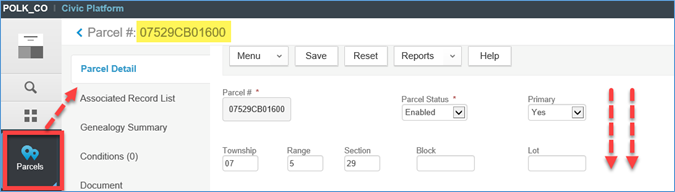
- Select the
permitting agency for each
dropdown value > click
Save at the top. The Service Locks won't be applied immediately. They will be added that night (around 4:00 AM) through the automated batch script mentioned above.
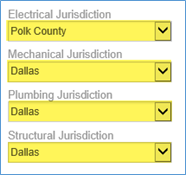
Routine APO load:
- Locate the file named
parcel_attr.txt file.
- Add 4 rows for every parcel; one for each “Jurisdiction" Parcel Attribute field:
- Electrical Jurisdiction
- Mechanical Jurisdiction
- Plumbing Jurisdiction
- Structural Jurisdiction
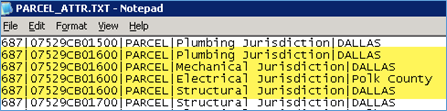
- This file will automatically populate the Parcel Attribute fields once the APO load is run.
- The Service Lock Condition automated batch script (mentioned above) will run, following the APO load, and add the appropriate Service Lock Conditions to the address(es).