To copy over information to new permits from an existing permit without having them be related, click on Description of Work/Copy Recs (Unrelated) in the Navigation Pane, select clone from the Menu drop down. You will have the option of selecting the type/types of reconrd that you want to copy, the number of records, and which information you want to copy over into the new record(s). This method for copying records will not create child records and each permit will have a distinct number.
We typically reccommend copying only the Address, Parcel, Owner, Licensed Professionals, and the Contact info. In addition, we do not recommend copying Record Details as this will bring over date fields that may not applicable to your new record and might affect your reporting. The highlighted fields are the ones that you DO NOT want to copy.
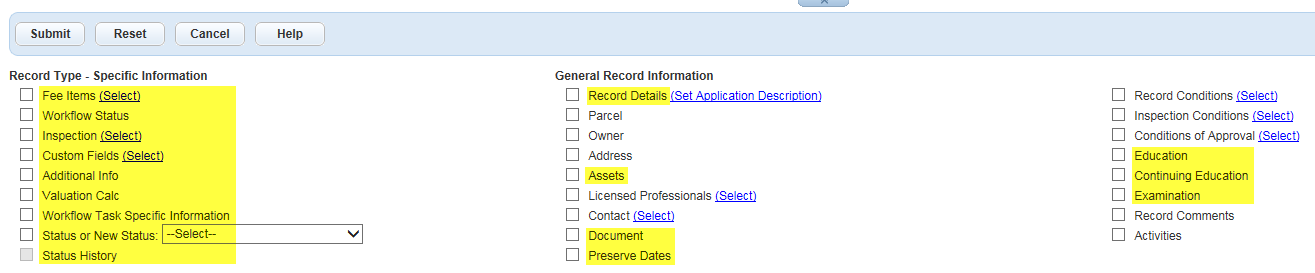
After selecting the appropriate boxes that you wish to clone/copy, click Submit and the new record will be created. A pop-up window will tell you if any information failed to transfer over. Be sure to go back into the newly created record and add the necessary data to the copied record; ASI, Description of Work, Workflow, etc.
Important note: Completion of the application specific information (ASI), the submitted Job Value, and/or Valuation Calculator will not automate fees on clones/copies for those record types where fees are traditionally automated at intake. Fees will need to be added manually through the Add Fees button.