
Oregon State Flag An official website of the State of Oregon »

Building data - type of work, category of construction, and building count

Type of Work


This is the Type of Work dropdown generally used in all Building record types. It is important to note that various standard reports include and are grouped by Type of Work – particularly, the Permits Issued reports – and this value becomes increasingly important to your local tax assessor in determining when and where new taxable square footage is added/involved.

The Type of Work is always related to the status of the structure the work is taking place in/on.

  • Addition – addition of new square footage
  • Alteration – alteration/remodel of existing square footage, no change to footprint
  • Demolition – complete removal of a structure, ‘to the dirt’
  • Move – relocation of entire structure
  • New – construction of a new structure and new square footage, this can include replacement structures but this is an agency decision (note that the Residential Structural record types include an ASI field for “Replacement Dwelling”; see ‘Replacement’ option below)
  • Other – where the other provided work types simply do not apply, often a decision by the Building Official
  • Repair – repair of existing structure or item/often trade specific and referred to in the code
  • Replacement – replacement of existing structure or item/often trade specific and referred to in the code

Type of Work - business case examples:

  • Brand new air conditioner (Mechanical) being added to an existing home that never had central air previously. TYPE OF WORK = ALTERATION. Some think a new system/fixtures/appliances would be ‘new’ but you’re actually altering the existing HVAC system to add in A/C to an existing (not new) structure.
  • Add of 500 square foot bonus room to existing home. TYPE OF WORK = ADDITION. Some lean towards calling this an alteration, in general they are remodeling – yes, but they are primarily adding new square footage to an existing structure.
  • Description/Scope of Work indicates “Replace/cap existing plumbing fixtures/replace water line (meter to house/underfloor) install backflow device for future irrigation system” to existing structure. TYPE OF WORK = ALTERATION. There is more than replacing like for like going on here, so replacement is probably too limited.
  • Add of plumbing to new construction single family dwelling. TYPE OF WORK = NEW. Typically would only see type of work as New when it’s a brand new structure under construction.
  • Add of two new bath fans to existing Manufactured Dwelling. TYPE OF WORK = ALTERATION. Keep in mind that Manufactured Dwellings are built in the factory and granted occupancy there – so you would never have the work type of New on a Manufactured Dwelling, the Placement permit is as close as you get. In Accela you would only use the Manufactured Dwelling record type for placement or replacement, and would otherwise use a Residential Structural permit for alterations or additions, same with the related trade permits.

Category of Construction

Category of Construction (C of C) is a very important piece of information used in categorizing types of permits/records for reporting purposes – along with Permit/Record type and Work Type – and aligns with Construction Type (ICC) and the Building Code.

In the Model, C of C is broken down between Residential and Commercial:

Residential

  • Detached Accessory Structure
  • Single Family Dwelling
  • Townhouses
  • Two Family Dwelling
  • Manufactured Dwelling
  • Other


Commercial

  • Accessory Structure
  • Commercial
  • Industrial
  • Mixed Use
  • Multi-family
  • Non-residential
  • Other
  • Residential
  • Sign


Building Count

Building count values are most often used for McGraw Hill and Dodge national construction data requests, as well as to evaluate growth in your jurisdiction.

Based on how this required data is reported – you would enter only NEW Residential Dwellings to the Dwelling Units field – and only NEW Commercial structures to the Number of Buildings field. 

Note: for NEW Multifamily – you would enter both values, the number of buildings and also the total number of Dwelling Units in that building (each building in Multifamily construction requires a separate structural permit, so this data would be entered into each record accordingly).
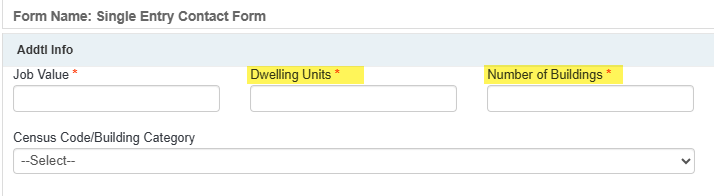


Beyond intake, this data is recorded and stored in the Valuation (Contractor) tab.